Hướng Dẫn Sử Dụng VST Omnisphere Cơ Bản
Hướng dẫn sử dụng VST Omnisphere: giao diện, sound browser, sound lock, kỹ thuật sound design. Synth mạnh mẽ từ Spectrasonics.
Hướng dẫn sử dụng VST Omnisphere: giao diện, sound browser, sound lock, kỹ thuật sound design. Synth mạnh mẽ từ Spectrasonics.
Hướng dẫn sử dụng VST Omnisphere
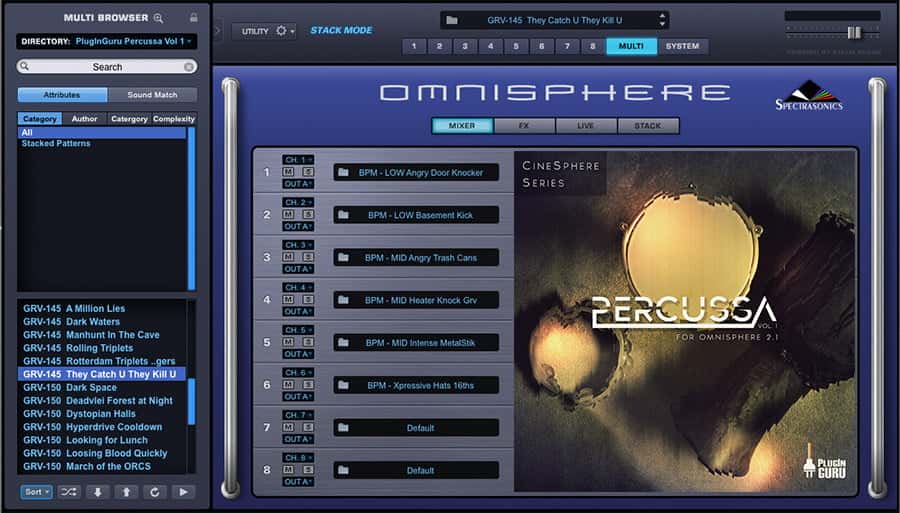
Omnisphere của Spectrasonics là một trong những synth mạnh mẽ và linh hoạt nhất. Với thư viện âm thanh khổng lồ (14,000+ preset), sound design depth, và khả năng tạo bất kỳ âm thanh nào. Omnisphere được producer chuyên nghiệp trên toàn thế giới sử dụng.
Tính năng chính
Sound Library: 14,000+ preset từ top sound designers. Synthesis: wavetable, FM, granular, vector, analog. Phần mềm thu âm: tạo âm thanh từ bất kỳ nguồn âm thanh nào. Live mode: thay đổi thông số realtime. Hardware integration: tương thích với nhiều hardware synth. FX rack: 58 effect units. 8 Layer multitimbral.
Cách dùng trong FL Studio
Channel Rack > + > Omnisphere. Mỗi preset có 4 layer. Sound Lock: ngẫu nhiên hóa preset. Live mode: gán MIDI controller. FX: thêm effect. Bắt đầu với preset có sẵn. Tìm hiểu synthesis: wavetable, filter, envelope. Tạo âm thanh riêng bằng phần mềm thu âm. Omnisphere là công cụ cho cả producer và sound designer.
Bài viết liên quan

Tachy
Independent Artist
Tachy là một nghệ sĩ độc lập tự sáng tác và phân phối sản phẩm của chính mình lên đa nền tảng âm nhạc số.
Follow